

OCI Registry
Overview
OpenTofu can source modules directly from OCI registries using the oci:// module source scheme. The Docker-compatible registry integration lets you securely store registry credentials in Scalr and inject them into plan and apply runs, so your runs can authenticate with private registries without embedding credentials in your code or environment variables.
This page covers direct oci:// module sources in OpenTofu runs. If you want Scalr to index OCI artifacts as modules in the Private Module Registry and let workspaces consume them through the standard Scalr module source address, see Publishing Modules from an OCI Registry.
This integration works with any registry that implements the Docker Registry HTTP API V2 and supports static username/password or personal access token (PAT) authentication, including:
- Docker Hub
- GitHub Container Registry (GHCR)
- GitLab Container Registry
- JFrog Artifactory
- Other Docker-compatible private registries
Cloud-provider registries not yet supportedRegistries that require provider-specific authentication flows — Amazon Elastic Container Registry (ECR), Azure Container Registry (ACR), and Google Artifact Registry — are not supported by this integration. Support for those registries will be added separately.
How It Works
When you create a Docker-compatible registry integration and enable Export credentials, Scalr securely injects the stored credentials into every plan and apply run on the account. Supported agents then write the credentials into the Docker auth configuration used by OpenTofu, which lets tofu init pull modules from the registry over oci:// without any further configuration on the workspace or in source code.
Credentials are encrypted at rest and are never returned in API responses.
Create the Integration
Navigate to the account scope, open Integrations, and select Docker registry. Enter:
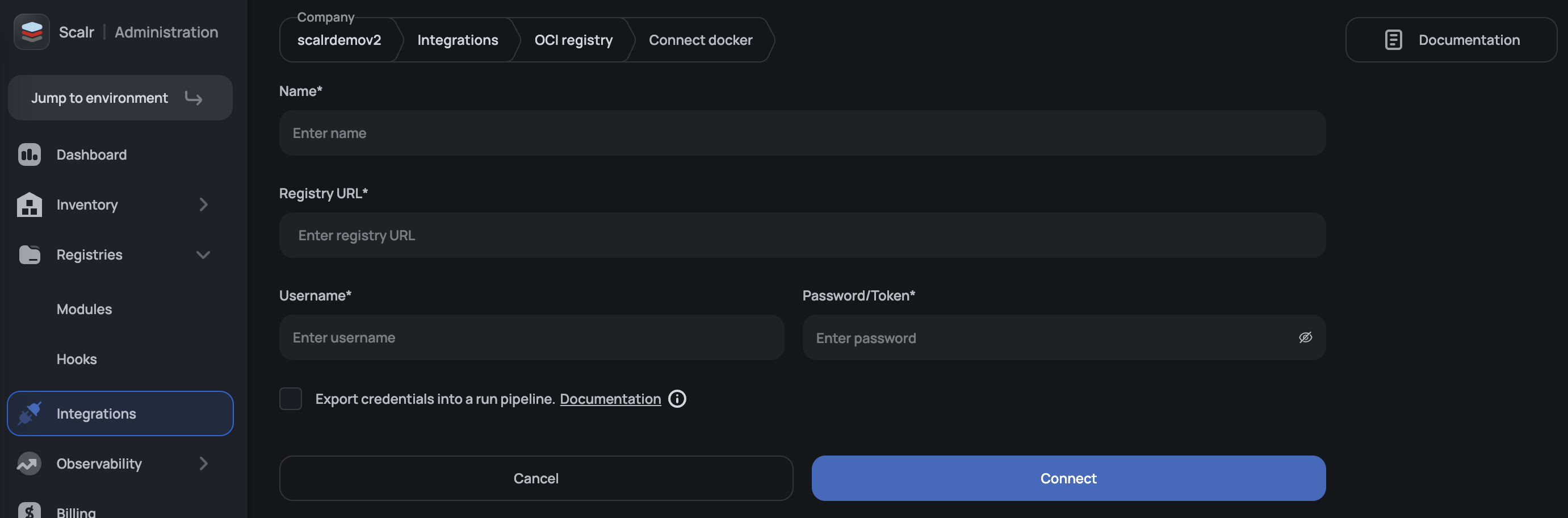
| Field | Description |
|---|---|
| Name | A descriptive name for the integration. |
| Registry URL | The exact HTTPS endpoint of the registry (for example, https://registry-1.docker.io). Redirecting URLs are rejected. |
| Username | The registry username or account associated with the token. |
| Password | The registry password or personal access token. Stored encrypted. |
| Export credentials | When enabled, Scalr injects the credentials into plan and apply runs for direct oci:// module access. |
Only one credential set per registry is exported into a given run. If you need to authenticate against multiple registries, create one integration per registry.
Registry URL Requirements
The Registry URL must point directly at the registry endpoint. Redirect URLs are rejected during validation. Use the registry-specific endpoint in the table below rather than the public-facing domain.
| Registry | Correct Registry URL |
|---|---|
| Docker Hub | https://registry-1.docker.io |
| GitHub Container Registry | https://ghcr.io |
| GitLab Container Registry | https://registry.gitlab.com |
| JFrog Artifactory | https://<your-subdomain>.jfrog.io |
For example, https://docker.io is rejected because it redirects to the Docker Hub website rather than serving the registry API.
Docker Hub
-
In Docker Hub, go to Account Settings → Security and create a Personal Access Token with
Read-only(or higher) permissions. -
Create a Docker-compatible registry integration with:
- Registry URL:
https://registry-1.docker.io - Username: your Docker Hub username
- Password: the PAT from step 1
- Export credentials: enabled
- Registry URL:
-
Reference the module in your OpenTofu code:
module "example" {
  source = "oci://registry-1.docker.io/<namespace>/<module-name>?tag=<version>"
}
GitHub Container Registry (GHCR)
-
In GitHub, create a classic personal access token with the
read:packagesscope (addwrite:packagesonly if you also need to publish modules). -
Create a Docker-compatible registry integration with:
- Registry URL:
https://ghcr.io - Username: your GitHub username
- Password: the PAT from step 1
- Export credentials: enabled
- Registry URL:
-
Reference the module:
module "example" {
  source = "oci://ghcr.io/<org-or-user>/<module-name>?tag=<version>"
}
GitLab Container Registry
-
In your GitLab project, create a Project Access Token with the
Developerrole and theread_registryscope (write_registryis only required if you publish modules from Scalr). -
Create a Docker-compatible registry integration with:
- Registry URL:
https://registry.gitlab.com - Username: the GitLab username or project access token name
- Password: the project access token from step 1
- Export credentials: enabled
- Registry URL:
-
Reference the module:
module "example" {
  source = "oci://registry.gitlab.com/<group>/<project>/<module-name>?tag=<version>"
}
JFrog Artifactory
-
In JFrog, create an identity token or API key for a user that has pull access to the Docker repository holding your modules.
-
Create a Docker-compatible registry integration with:
- Registry URL:
https://<your-subdomain>.jfrog.io - Username: the JFrog username
- Password: the identity token or API key
- Export credentials: enabled
- Registry URL:
-
Reference the module:
module "example" {
  source = "oci://<your-subdomain>.jfrog.io/<repo>/<module-name>?tag=<version>"
}
Permissions
Creating, updating, or deleting a Docker-compatible registry integration follows the same RBAC model as other account-scoped integrations. Grant the appropriate integrations permissions to the roles that need to manage registry credentials.
Troubleshooting
oci:// module source fails during init with a 401 or 403. Confirm that the integration is active and that Export credentials is enabled. Also verify that the credentials in the integration still have access to the target repository — revoked or expired tokens produce the same error.
Validation rejects the registry URL. The Registry URL must be an exact, non-redirecting HTTPS endpoint. Check the Registry URL Requirements table for the correct endpoint per registry.
init succeeds but the wrong credentials are used. Only a single credential set per registry host is injected into a given run. If more than one Docker-compatible registry integration targets the same host, only one will be active. Consolidate them into a single integration or disable Export credentials on the unused ones.
Updated 5 months ago