

Environment Locking
Overview
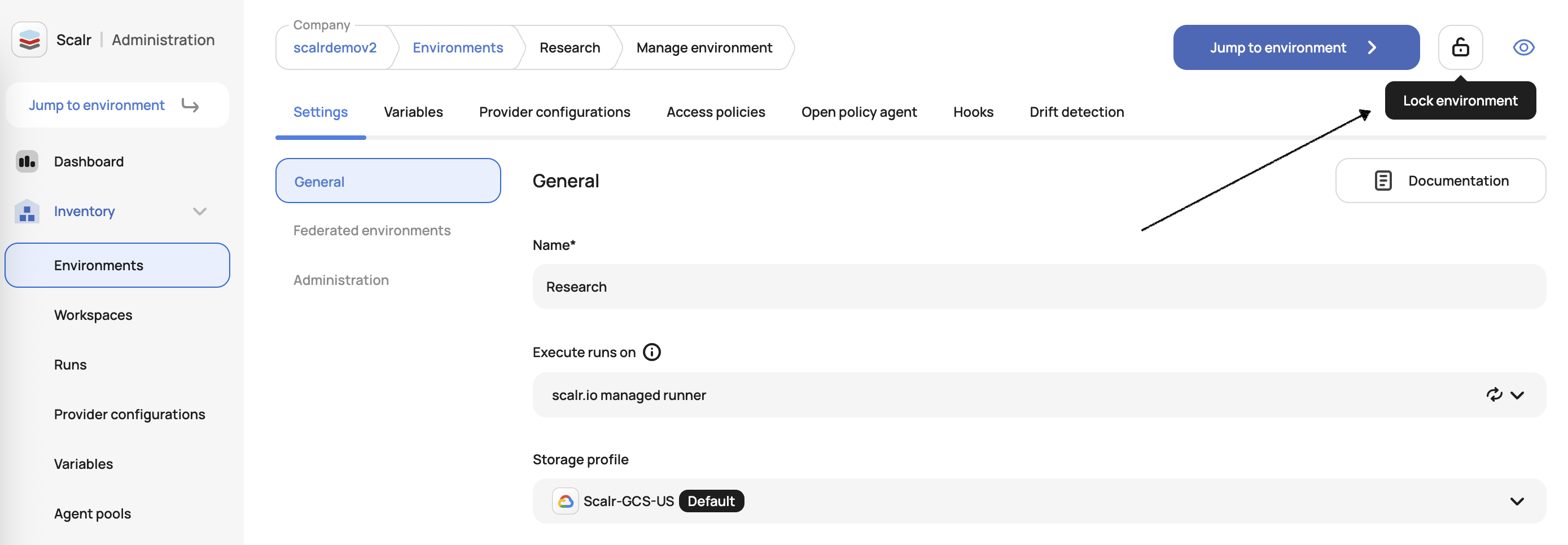
Environment administrators can lock or unlock entire environments from the Environment settings page. When an environment is locked, all new and existing runs across every workspace in that environment will enter a pending state until the environment is unlocked.
Only users with the environments:lock permission can lock or unlock environments. This permission should be granted carefully to ensure appropriate access control.
The locking of an environment can be done in the environment management page:
Use Cases
Environment locking provides a mechanism to quickly halt infrastructure changes during:
- Incident response - Prevent additional changes while investigating or resolving production issues
- Maintenance windows - Freeze infrastructure modifications during scheduled maintenance
- Compliance audits - Ensure no changes occur during audit periods
- Change freeze periods - Enforce deployment freezes (e.g., holidays, critical business periods)
Behavior
When an Environment is locked, the following applies:
New runs:
- Are queued in the system
- Receive a Pending status
- Will not progress to planning or apply stages
- Remain queued until the environment is unlocked
In-progress runs:
- Complete their current running stage
- Are not forcibly terminated
- Cannot start new stages while the lock is active
When an Environment is Unlocked
- All pending runs resume normal processing
- New runs behave normally
Updated 9 months ago
Did this page help you?