

Wiz
Overview
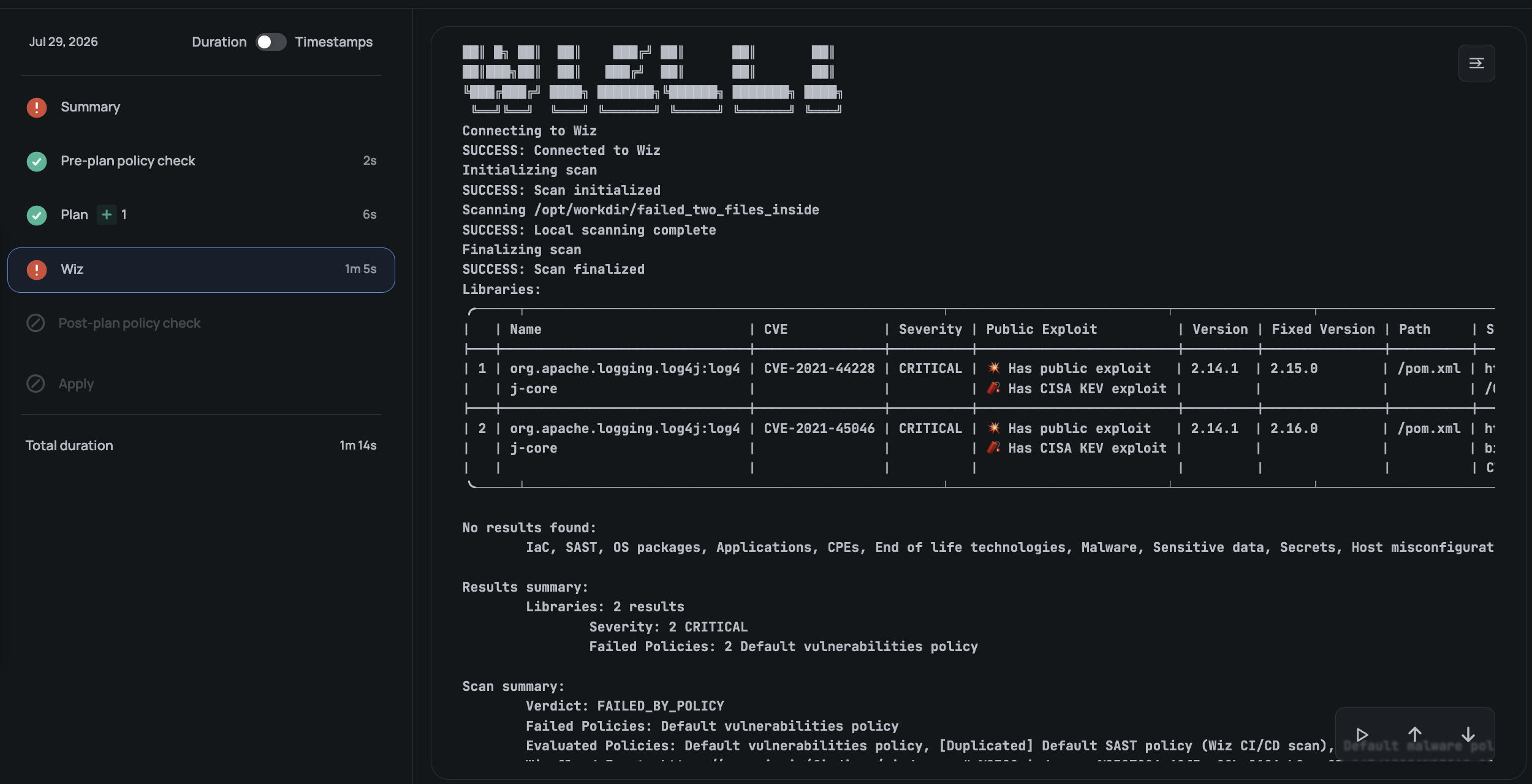
Wiz identifies security issues in infrastructure as code. The Scalr integration runs a Wiz scan after the Terraform or OpenTofu plan finishes and before the run can continue to apply.
The scan analyzes the configuration source and the exported plan data. It runs the Wiz CLI directory scan with the default Wiz scanners, so the result is not limited to IaC misconfigurations: secrets detection and SAST findings for the scanned files are included as well. The native Wiz CLI output is available from the Wiz step in the run pipeline. The full Wiz result is also available to Scalr Open Policy Agent (OPA) policies.
Wiz integrations are configured at the account scope and enforced in selected environments. Users need the integrations:read permission to view the integration and integrations:manage to create or change it. An account can have one Wiz connection.
Prerequisites
Before creating the connection, prepare:
- A Wiz service account with the
create:security_scanspermission. See
Wiz service account settings. - The service account's client ID and client secret.
- The exact display names of any Wiz CI/CD scan policies that should be applied by default.
- If the selected environments use self-hosted agent pools, ensure that their agents run Scalr
Agent version1.3.0or later. No customer action is required for Scalr-managed execution.
Connect Wiz
- At the account scope, go to Integrations, select Wiz, and start a connection.
- On the Credentials step, enter:
- Client ID — the client ID of the Wiz service account.
- Client Secret — the client secret of the Wiz service account.
- API Endpoint URL — select the endpoint that matches the Wiz tenant:
- Default (app.wiz.io)
- GovCloud (gov.wiz.io)
- FedRAMP (app.wiz.us)
- Select Continue. Scalr validates the credentials against the selected Wiz endpoint.
- On the Scan settings step, select an enforcement mode and, optionally, enter default policy names. Separate multiple policy names with commas.
- On the Enforced in environments step, either:
- Enable Enforce Wiz scans in all current and future environments.
- Select the individual environments where Wiz scans should run.
- Select Save connection.
Scalr adds a Wiz post-plan scan to every run in workspaces within the selected environments.
Enforcement Modes
The integration supports two enforcement modes.
Policy Check
Wiz results are evaluated by Scalr OPA policies. The complete validated Wiz result is available at input.run_tasks.wiz in the post-plan policy input.
Use this mode when Scalr policies should decide whether findings block a run. Configure a post-plan OPA policy to handle the Wiz verdict, scan statistics, and scan errors according to your organization's requirements. See Policy as Code for details about creating policy groups and evaluating run data.
If the scan cannot run, Scalr exposes an error result to the policy instead of silently omitting the Wiz data. Policy authors should decide whether an unavailable or errored scan blocks the run.
For example, the following policy blocks a run when Wiz reports a policy failure or when the scan could not be scheduled or completed:
package terraform

import rego.v1

deny contains "Wiz scan failed one or more policies" if {
    input.run_tasks.wiz.status.verdict == "FAILED_BY_POLICY"
}

deny contains "Wiz scan was not executed" if {
    input.run_tasks.wiz.status.verdict == "UNREACHABLE"
}

deny contains "Wiz scan did not complete" if {
    input.run_tasks.wiz.status.verdict == "ERRORED"
}
Auto-fail
Scalr blocks the run when the Wiz scan reports a policy failure or cannot complete successfully. This mode does not rely on an OPA policy to enforce the Wiz result.
A Wiz warning is shown as a warning and does not block the run.
Default Policies
The Default policies field accepts the exact display names of CI/CD scan policies configured in the Wiz tenant. Scalr passes each name to Wiz when the scan starts.
If a configured policy is renamed or removed in Wiz, the scan fails because Wiz can no longer resolve that policy. Update the connection in Scalr whenever the corresponding Wiz policy names change.
When the field is empty, Scalr does not select policies by name and Wiz determines the applicable
scan policies.
View Wiz Results
Open a run and select the Wiz post-plan step to view the native Wiz CLI output and the step status.
For policy-check mode, download or inspect the run's policy input to see the exactinput.run_tasks.wiz object evaluated by OPA. Wiz owns the nested result schema, so policies should use the fields present in the current policy input rather than assuming that all optional result fields are always available.
Updated about 2 months ago